Wednesday, 26 August 2015

Apply Custom Filter on Lookup Field in Dynamics CRM using Script

Introduction
In this blog we are going to see how to apply custom filter to the lookup field using the JavaScript functions.
In Microsoft Dynamics CRM we can filter a lookup field on form using the Fetch XML condition and “addPreSearch()“ method.
Example
On the Contact Entity there is a lookup field named “Account Name” and a text field “Address1: City” as shown in below screenshot.custom_filter
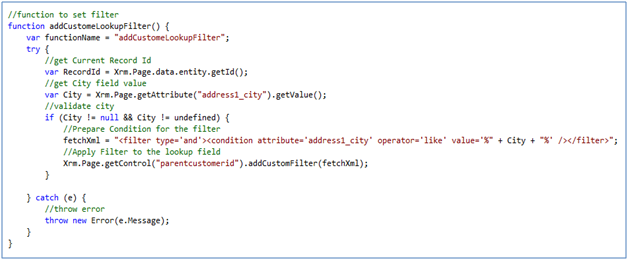
So, Here If we want to filter Account records in lookup view by city having value equal to field Address1: City. We can do this by writing the below code in Jscript.
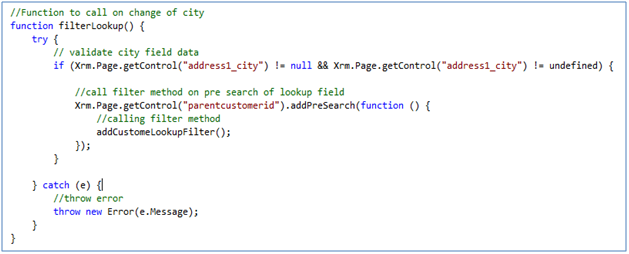
Here we have written two functions “filterLookup()” and “addCustomeLookupFilter()”  as shown in the below code snippets.
 custom_filter1
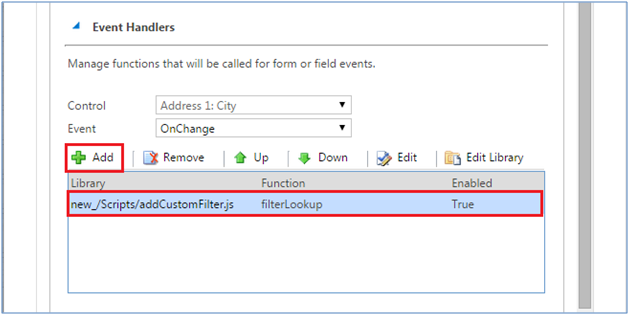
We have created CRM webresource for the javascript and called “filterLookup” function on change event for field “Address1: City” field as below for contact entity form.custom_filter2
Function “filterLookup” will be trigger on change of field “Address1: City”. This binds “addPreSearch” event to lookup control “parentcustomerid”.custom_filter3
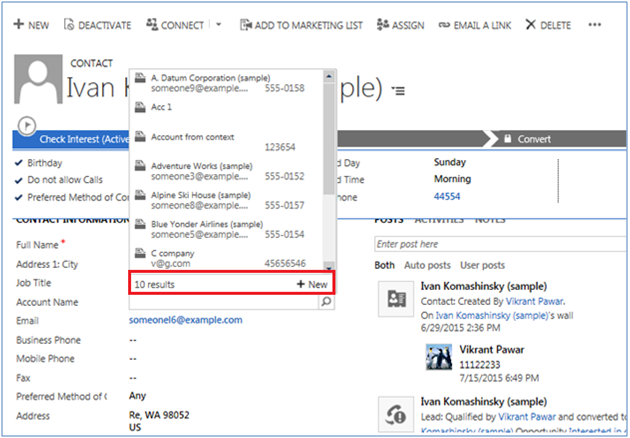
Open the contact entity record, Before entering the “Address1:City” field value the lookup field shows all the account records as below screenshot.custom_filter4
Enter the value for “Address1: City” here it is “US” as below.custom_filter5
Then Check for the suggested options for the Account lookup. Only those accounts records will be available to select which having city “US”.


Tuesday, 28 July 2015

WCF REST Sample with RSharper

RESET SERVICE


[ServiceContract]
public interface IAtolApcService
    {
        /// <summary>
        /// Submits the atol return.
        /// </summary>
        [OperationContract]
        [WebInvoke(Method = "POST",
            RequestFormat = WebMessageFormat.Json,
            ResponseFormat = WebMessageFormat.Json,
            UriTemplate= "SubmitAtolReturn")]
        void SubmitAtolReturn(AtolReturn atolReturn);
}

Web Config Changes

  <behaviors>
      <endpointBehaviors>
        <behavior name="Web">
          <webHttp helpEnabled="true" />
        </behavior>
      </endpointBehaviors>
      <serviceBehaviors>
        <behavior name="serviceBehaviour">
          <serviceMetadata httpGetEnabled="true" httpsGetEnabled="true" />
          <serviceDebug includeExceptionDetailInFaults="true" />
        </behavior>
        <behavior name="">
          <serviceMetadata httpGetEnabled="true" httpsGetEnabled="true" />
          <serviceDebug includeExceptionDetailInFaults="false" />
        </behavior>
      </serviceBehaviors>
    </behaviors>
<services>
  <service behaviorConfiguration="serviceBehaviour" name=" WcfService.AtolApcService">
        <endpoint address="" behaviorConfiguration="Web" binding="webHttpBinding" bindingConfiguration="restBinding" contract=" WcfService.IAtolApcService" />
      </service>
    </services>


RESET Client

using Newtonsoft.Json;
using RestSharp;

public static void SubmitAtolReturn(AtolReturn atolReturn)
        {
            string resource = "/SubmitAtolReturn";

            var client = new RestClient(System.Configuration.ConfigurationManager.AppSettings["RESTUrl"].ToString());
            var request = new RestRequest(resource, Method.POST) { RequestFormat = DataFormat.Json };
            var json = JsonConvert.SerializeObject(atolReturn);

            //request.AddUrlSegment("atolLicenceGuid", AtolLicenceGUID);
            //request.AddUrlSegment("portalUsername", PortalUsername);
            request.AddParameter("application/json", json, ParameterType.RequestBody);

            var fullURL = System.Configuration.ConfigurationManager.AppSettings["RESTUrl"].ToString() + request.Resource;

            var response = client.Execute(request);
            switch (response.ResponseStatus)
            {
                case ResponseStatus.Completed:
                    break;
                case ResponseStatus.Error:
                    throw new Exception(String.Format("errorpage.aspx?CallingMethod={0}&ErrorMessage={1}&RESTCall={2}", System.Reflection.MethodBase.GetCurrentMethod().Name, response.ErrorMessage, fullURL));

                default:
                    throw new Exception(String.Format("errorpage.aspx?CallingMethod={0}&ErrorMessage={1}&RESTCall={2}", System.Reflection.MethodBase.GetCurrentMethod().Name, response.ErrorMessage, fullURL));
            }

        }

Monday, 13 July 2015

Dynamics CRM Explorer missing from Visual Studio

After installed CRM developer tool kit some times the CRM explorer window doesn't popup when we open the solution.

In that case open the project solution file in notepad and make sure below information is there.


Global
  GlobalSection(CRMSolutionProperties) = preSolution
    SolutionIsBoundToCRM = TRUE
  EndGlobalSection
EndGlobal